How to Handle a DSAR in 72 Hours: A Step-by-Step Playbook for Indian Businesses
A Data Subject Access Request under DPDPA is a legal obligation with a timeline. Here is the exact process your team needs to fulfil it without creating liability.

A Data Subject Access Request (DSAR) shows up in your inbox looking like just another support ticket. It isn't. Under DPDPA, it's a customer invoking a legal right, and the clock starts the moment it lands. Get the process wrong and you're not just annoying a customer; you're creating a compliance record that a regulator can pull up later.
Under the DPDP Rules, your Grievance Officer has to acknowledge a complaint within 48 hours, with resolution timelines set by the Data Protection Board of India. That sounds manageable when you get one DSAR a month. It stops being manageable when you're getting forty a week and half your team doesn't know which system holds what. I've reviewed enough of these workflows to say the difference between a company that handles this well and one that doesn't. It's whether someone actually wrote the process down before the volume hit.
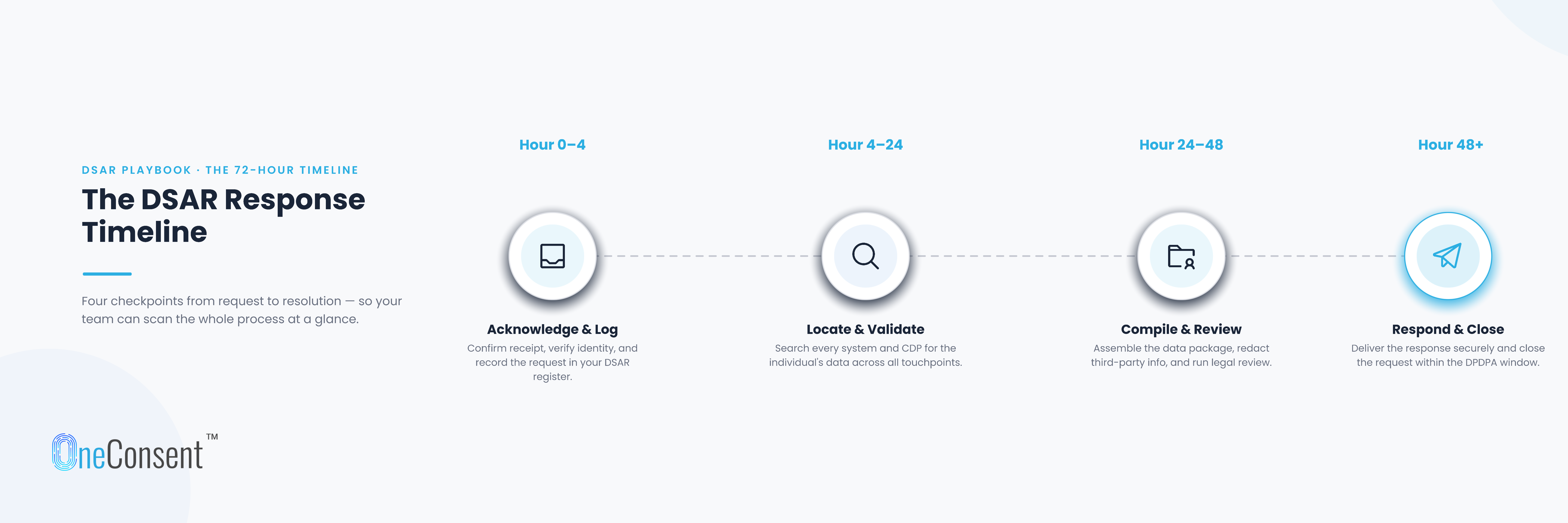
Hour 0 to 4: Log the Request Properly
The moment a DSAR arrives, whether through your Grievance Officer portal, a support email, or your customer app, it needs to be logged with a timestamp, the Data Principal's identity, the specific right being exercised (access, correction, erasure, or a straight complaint), and a case number. Send an acknowledgement right away, even a basic one. This isn't a courtesy step. It's the first entry in an audit trail you may need to produce months from now.
Most teams skip this in the first few weeks because the volume is low and everyone remembers who asked for what. Then volume triples and nobody remembers anything. Build the habit early.
Hour 4 to 24: Verify Who's Asking
Before you touch a single record, confirm the requester is actually who they say they are. This matters for every request type, but it's non-negotiable for erasure requests. Delete a real customer's data because someone else filed a fraudulent request in their name, and you've created a new problem that's arguably worse than the one you were trying to solve.
A simple two-factor check works fine here: email confirmation paired with an OTP or a security question tied to the account. Nothing exotic. Just don't skip it because a request looks urgent.
Hour 24 to 48: Meet the Acknowledgement Deadline
This is the one obligation with a hard number attached to it. Your Grievance Officer must acknowledge the complaint within 48 hours, confirming receipt and giving the requester a resolution timeline. It doesn't matter if you're processing five requests that week or five hundred. The acknowledgement has to go out inside that window, every time.
Related Reads: Data Principal Rights Under DPDPA: Access, Correction, Erasure and Nomination Explained
Hour 48 Onward: Retrieve, Correct, or Erase
This is where the actual work happens, and it looks different depending on what was asked for.
For an access request, you pull every piece of personal data held about that individual across every system it touches: CRM, transaction database, marketing automation, analytics, and any third-party processor working on your behalf. Put it together in a format the person can actually read. And strip out anything belonging to a third party that happens to be sitting in the same record, because that's not theirs to see.
For a correction request, the fix goes into your system of record first, then cascades down to every downstream system pulling from it. Write down what changed, who changed it, and when. Skipping this documentation step is one of the more common shortcuts I've seen teams take, and it's the one that causes the most trouble later.
For an erasure request, deletion has to run across everything, including backups and anything sitting with third-party processors. Confirm the deletion back to the person who asked, and if some data legally has to stay (a tax record, say, or something under a retention mandate), say so clearly. Don't just go silent on that part.
Documenting the Response
Everything above needs a paper trail: the original request, how identity was verified, what data was retrieved or changed or deleted, and confirmation the action was completed. If the Data Principal ever escalates to the Data Protection Board, this documentation is what you'll be judged on. Not your intentions. The record.
A DPO I spoke to last year put it simply: "the request itself takes an hour, the documentation is what saves you six months later." That's stuck with me, because it's true across almost every compliance function, not just DSARs.
When You Can't Meet the Timeline
Sometimes you genuinely can't resolve a request in time. Maybe the data spans a legacy system nobody's touched in years, or there's a genuine legal question about what can be deleted. When that happens, tell the person proactively and write down why. A delay explained upfront reads very differently to a regulator than a delay that only surfaces after a complaint gets filed. Silence is the mistake here, not the delay itself.
Getting This Right, Long Term
A DSAR process that actually works isn't a compliance checkbox sitting in a policy document somewhere. It's an operational habit, built into how your support and legal teams talk to each other on a normal Tuesday. Customers who get a prompt, clear response to a rights request tend to stay customers. The ones who get silence or a runaround are the ones who end up filing a Board complaint, and that's a far more expensive outcome than the process itself ever would have been.
If your current setup relies on someone manually checking five different systems every time a request comes in, it's worth automating that lookup before the volume forces the issue. OneConsent's customer portal lets Data Principals raise and track DSARs directly, while giving your compliance team a single place to fulfil them within the required window.
Backlink: OneConsent (https://oneconsent.ai)
Frequently Asked Questions
Have more questions?
Search our full DPDP knowledge base for more answers.